

Think about how many passwords you have. Now think about how many of them are variations on the same three. Passwords are a bad idea that we've all agreed to live with, and passkeys are the first replacement that's actually catching on.
What a passkey is
When you create a passkey, your phone or laptop generates two linked keys. The public one goes to the website. The private one stays on your device and never leaves it. To sign in, the site sends a random challenge, your device signs it with the private key, and the site verifies the signature with the public key.
You unlock the private key with whatever you already use for your device: fingerprint, face or PIN. That's all you see. No typing, no "forgot password" link.
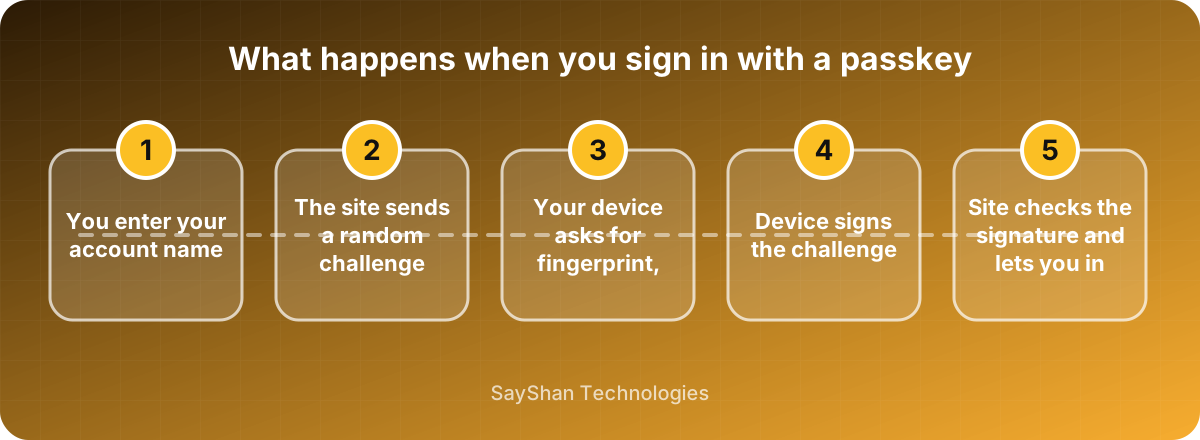
One detail people often get wrong: your fingerprint isn't sent to the website. It only unlocks the key on your own device.
Why it's safer
The big one is phishing. A passkey is tied to the real website's address, so if someone sends you to a convincing fake, your device simply won't offer it. There's nothing to type into the fake page, because there's no secret to type.
Then there's the database problem. A site using passkeys stores only public keys. If that database leaks, the attacker gets a list of keys that are useless for signing in. Compare that with a leaked password table, which is a gift.
And there's no reuse, because every site gets its own key pair. You can't make the "same password everywhere" mistake even if you want to.
The hard parts
Passkeys aren't difficult to add, but a few decisions are easy to underestimate.
Recovery. What happens when someone loses their phone? If the answer is "email them a link", then your account security is only as strong as that email account, and you've kept the weak spot you were trying to remove. Think this through before launch, not after the first support ticket.
Multiple devices. Many phones and computers sync passkeys through the user's account with the platform. Some don't. Let people register more than one passkey, so a lost device isn't a lockout.
Older hardware. Not everyone has a recent browser or phone. Keep a fallback sign-in method for now.
Borrowed computers. Good implementations let you sign in on someone else's laptop using the passkey on your phone. Test that flow, since people do use it.
How we'd roll it out
Use the WebAuthn standard through a well-tested library. Don't write the cryptography yourself; this is the one place where "we'll build it ourselves" is nearly always a mistake.
Offer passkeys next to passwords at first. A good moment to suggest one is right after a successful password sign-in, when the user is already logged in and in a good mood. Watch two numbers: how many people adopt passkeys, and whether support requests go up or down.
Once most of your active users have one and recovery is working smoothly, you can start making passwords optional, then eventually hide them. Don't rush that last step. Some users will keep their password for years, and that's fine.