
Customers trust you with their information: names, phone numbers, addresses, payment details and sometimes far more. Handling it carefully is the right thing to do, it protects your reputation and, in many countries, it is also the law. The good news is that good privacy practice is mostly discipline rather than complicated technology.
What counts as personal data?
Personal data is any information that can identify a person, directly or in combination with other data: name, email address, phone number, home address, IP address, device identifiers, location and photos. Sensitive data such as health, biometric, financial and children's information deserves extra care and often stricter rules.
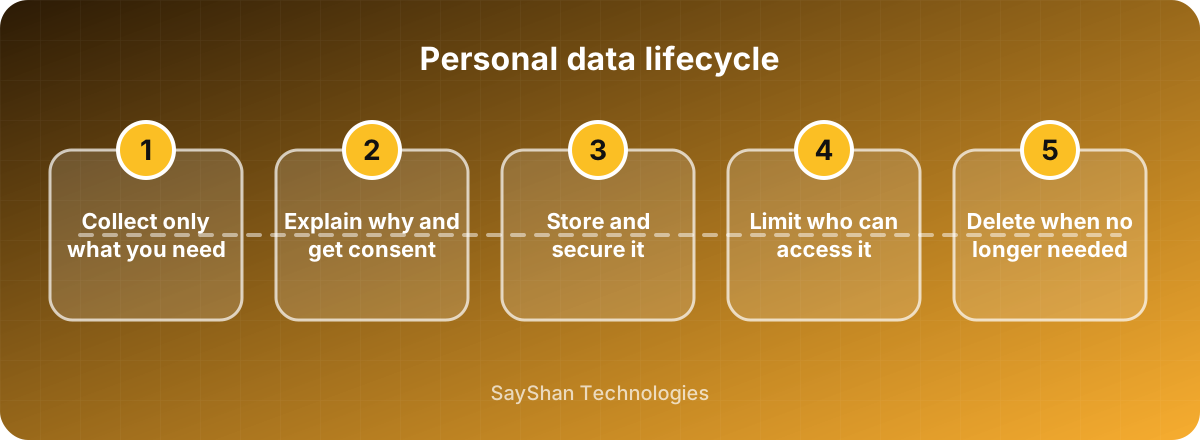
Principle 1: collect only what you need
Every extra field is data you must secure and may one day lose. Before adding a field, ask what you will use it for. If you cannot name a clear purpose, do not collect it. Less data means a smaller risk, lower storage costs and simpler compliance.
Principle 2: be transparent
Explain in plain language what you collect, why, who it is shared with and how long you keep it. A clear privacy policy and an honest cookie banner build trust. Ask for consent where the law requires it, for example for analytics or marketing cookies, and make it as easy to refuse as to accept.
Principle 3: secure it
- Encrypt data in transit with HTTPS and, for sensitive fields, at rest.
- Use strong authentication and role-based access, and grant people the minimum access needed for their job.
- Keep software patched and take regular, tested backups.
- Separate production data from development; use fake or anonymised data for testing.
- Choose service providers carefully and sign data-processing agreements with them.
Principle 4: limit retention
Keep personal data only as long as you need it. Define retention periods, delete or anonymise old records automatically and remove the data of closed accounts. Data you no longer hold cannot be leaked.
Principle 5: respect people's rights
Many regions give individuals rights over their data, such as access to a copy, correction of errors, deletion and objection to marketing. Build a simple, documented process to handle these requests promptly, and verify the requester's identity before sharing anything.
Prepare for a breach
Even careful companies can suffer incidents. Prepare in advance:
- Know what data you hold and where it lives.
- Have a contact list and a plan: who investigates, who decides, who informs customers.
- Understand your legal duty to notify regulators and affected people, which often has strict deadlines.
- Practise the plan once a year.
Know the rules that apply to you
Regulations differ by country and industry. Examples include the EU's GDPR, various national data-protection laws and sector rules for payments and health. If you serve customers abroad, check the requirements that apply to you and ask a qualified adviser when in doubt. This article is general information, not legal advice.
Key takeaways
- Collect less data and keep it for less time.
- Be open about what you do and get consent where required.
- Encrypt, restrict access and keep software updated.
- Have a process for people's requests and for incidents.
Keep learning
Frequently asked questions
Do small businesses need a privacy policy?
Almost always, yes. If your site or app collects any personal data, including through forms, analytics or cookies, you should explain what you do with it.
Is storing data in the cloud less safe?
Not necessarily. Reputable cloud providers offer strong security, but you remain responsible for configuring access correctly and for choosing where data is stored.
What is data minimisation?
It is the principle of collecting and keeping only the personal data that is necessary for a specific purpose.
How do cookie banners relate to privacy?
Non-essential cookies, such as analytics and advertising, usually require the visitor's consent in many regions. A good banner lets people accept or refuse each category easily.