

Few phrases in security have been stretched as far as "zero trust." Vendors stick it on everything from firewalls to login tools. So it's no surprise that many people think it's a product they can purchase. It isn't. It's a way of thinking, and the core idea is simple enough to say in a sentence.
Don't trust anyone or anything automatically, whether they're inside your network or outside it. Check every time.
The old way: a castle and a moat
For years, company security worked like a medieval castle. Strong walls around the edge (the firewall), and once you were inside, you were trusted. Staff sat in the office, systems lived in the office, and the network boundary meant something.
That model has cracked for obvious reasons. People work from home, cafés and airports. Software runs in the cloud. Staff use their own phones. Partners and contractors need access. There's no clear edge any more.
Worse, the castle model has a nasty weakness: once an attacker gets in, by phishing one employee, say, they can often roam freely. Many of the big breaches work exactly this way. One stolen login, then wide access.
The zero trust approach
Zero trust assumes an attacker might already be inside, and designs accordingly. A few principles:
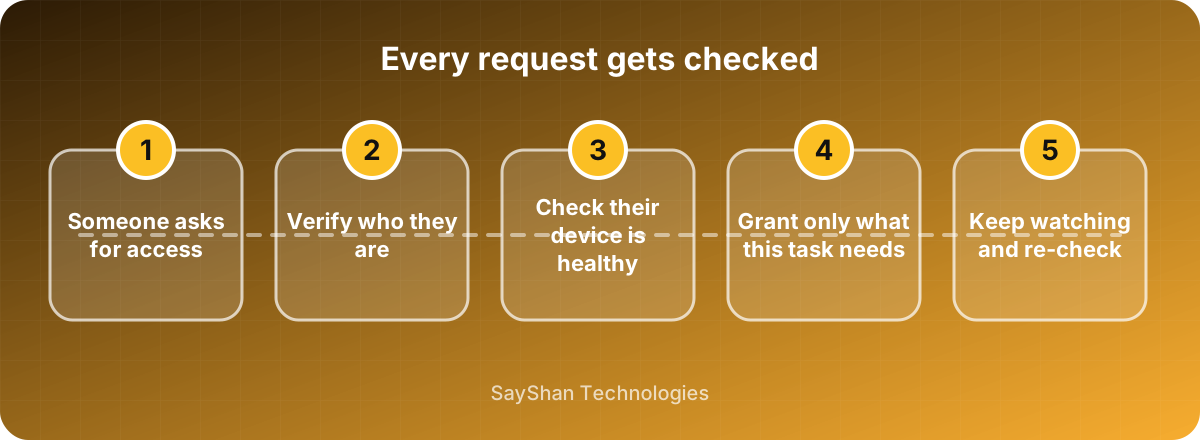
Verify explicitly. Every request is checked: who are you, is this really you, is your device in good shape, does this look normal? Being on the office network doesn't count as proof.
Give least access. People and systems get only what they need for their job, and only for as long as they need it. The accountant doesn't need the source code, and the developer doesn't need payroll.
Assume breach. Plan as if something will go wrong. Limit how far an intruder can move, log what happens, and make it easy to spot odd behaviour.
What it looks like in real life
You don't need an expensive project to start. Many of the most valuable steps are things you can do now:
- Strong sign-in for everyone. Two-factor authentication on all accounts, ideally phishing-resistant methods such as passkeys.
- Least privilege. Review who has access to what. Remove old accounts, shrink admin rights, and give contractors time-limited access.
- Device checks. Make sure devices are updated, encrypted and have a screen lock before they can reach company data.
- Split up your network. Don't put everything on one flat network where one compromised laptop can reach every server. Separate important systems.
- Protect the apps, not just the network. Put a proper login in front of internal tools, so they don't rely on "only people in the office can reach this."
- Logging and alerts. Know who accessed what, and get warned about strange behaviour, such as a login from a new country at 3 a.m.
What it isn't
It isn't a single product. Anyone who sells you "zero trust in a box" is overselling.
It isn't about distrusting your staff. It's about not letting one stolen password or one infected laptop become a disaster. A good setup is mostly invisible to honest users.
And it isn't an all-or-nothing switch. Most organisations get there gradually, over months or years.
Where to start
Pick the highest-value targets first: your email, your admin accounts, your customer data. Protect those properly with strong sign-in and tight access. Then work outward.
A sensible order for most small and mid-sized organisations:
- Two-factor authentication everywhere.
- Tidy up access and remove what isn't needed.
- Keep devices updated and encrypted.
- Add logging and basic alerts.
- Gradually separate systems and move internal tools behind proper logins.
The trade-off
More checks can mean more friction. If staff keep hitting annoying prompts, they'll look for ways round them. Good zero trust design makes the secure path the easy one, for example with single sign-in and biometric unlock, instead of piling on passwords. Test with the people who'll live with it.