
Launching is the start of operating your software, not the end. Servers fill up, dependencies fail, traffic spikes and bugs slip through. Good monitoring tells you about problems before your customers do and gives you the evidence to fix them quickly.
The three signals: logs, metrics and traces
- Logs explain what happened. Write structured logs (for example JSON) with a request ID, user or tenant ID, and severity, so you can follow one request across services and search efficiently.
- Metrics show trends over time: response times, error rates, throughput, queue length, CPU, memory and database connections. They tell you that something is wrong and how bad it is.
- Traces show where time is spent inside a slow request across services, helping you find the real bottleneck.
Together they answer three questions: is something wrong, where is it wrong and why.
What to monitor first
You do not need a huge setup. Start with the basics:
- Uptime checks on your most important pages and API endpoints, from outside your network.
- Error tracking that groups exceptions, shows how many users are affected and which release introduced the problem.
- Resource alerts for disk space, memory, CPU and database connections.
- Queue and job health if you process background work: failed jobs and growing backlogs.
- Business metrics such as sign-ups, orders and payments. A drop in orders is sometimes the first sign of a technical problem.
Alert on symptoms, not noise
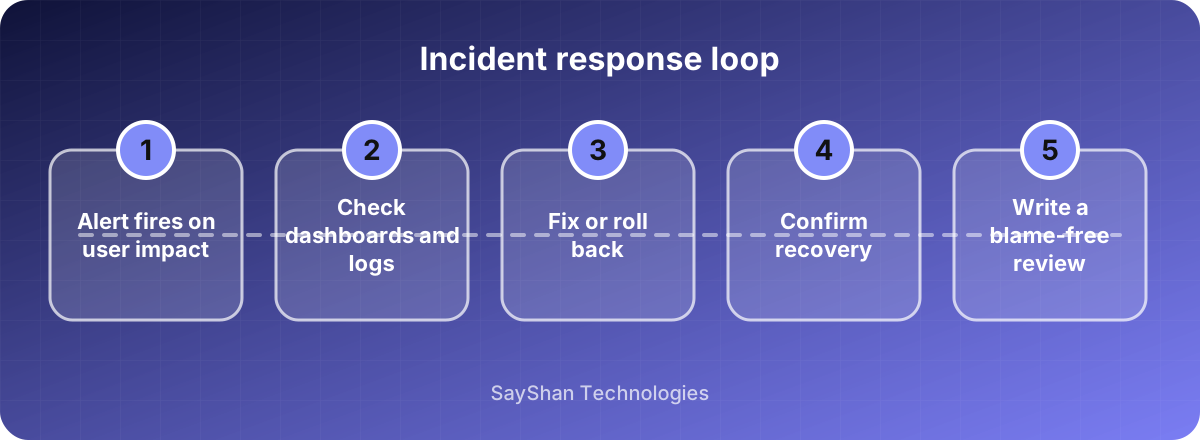
Page a person when users are affected, for example when the error rate or response time stays above a threshold for several minutes, or when the site is down. Send everything else to a dashboard or a daily summary. Too many alerts teach people to ignore them, which is worse than having none.
Good alerts are:
- Actionable: someone knows what to check when it fires.
- Urgent: it needs attention now, not next week.
- Documented: a short runbook explains first steps.
Dashboards that help
Build one overview dashboard that a person can understand in ten seconds: traffic, error rate, response time and the health of critical dependencies. Add detailed dashboards per service for investigation, not for decoration.
Security and audit signals
Log important events such as sign-ins, failed logins, permission changes and data exports. Watch for unusual patterns such as many failed logins from one address. Never log passwords, tokens or full card numbers.
Backups and recovery
Monitoring tells you when something breaks; backups let you recover. Take regular automatic backups, store a copy in a different location and practise restoring. A backup you have never restored is only a hope. Write down how long recovery should take and test that it does.
Learn from incidents
After any outage, write a short, blame-free review:
- What happened and what was the impact?
- How was it detected, and how fast?
- How was it fixed?
- What will prevent it or shorten it next time?
Focus on systems and processes, not on individuals. Each review makes the system, and the team, stronger.
Key takeaways
- Use logs, metrics and traces together.
- Start with uptime, error tracking and resource alerts.
- Alert on user impact and keep noise low.
- Test your backups and review every incident without blame.
Keep learning
Frequently asked questions
Do I need expensive tools?
No. Many excellent open-source and affordable hosted tools exist. Start simple and add depth as you need it.
How many alerts are too many?
If people ignore or mute them, you have too many. Each alert should require action.
What is an SLO?
A service level objective is a target such as "99.9% of requests succeed". It gives your team a shared definition of reliable enough.
How long should I keep logs?
Keep detailed logs for a few weeks and summarised data longer, depending on your needs and legal requirements. Avoid storing personal data longer than necessary.