

Every developer has said it at some point: "But it works on my machine." The app runs fine on your laptop, then breaks on the test server because of a different version of PHP, a missing library or a setting nobody wrote down.
Docker exists to end that argument. It lets you package an application together with everything it needs, so it runs the same way everywhere.
Images and containers
Two words cause most of the early confusion, so let's pin them down.
An image is a package: your code, the runtime it needs (say PHP or Node), the libraries and the settings, all frozen together. Think of it as a recipe plus all the ingredients, sealed in a box.
A container is what you get when you run that image. It's a live, running instance. You can start ten containers from one image, and they won't interfere with each other.
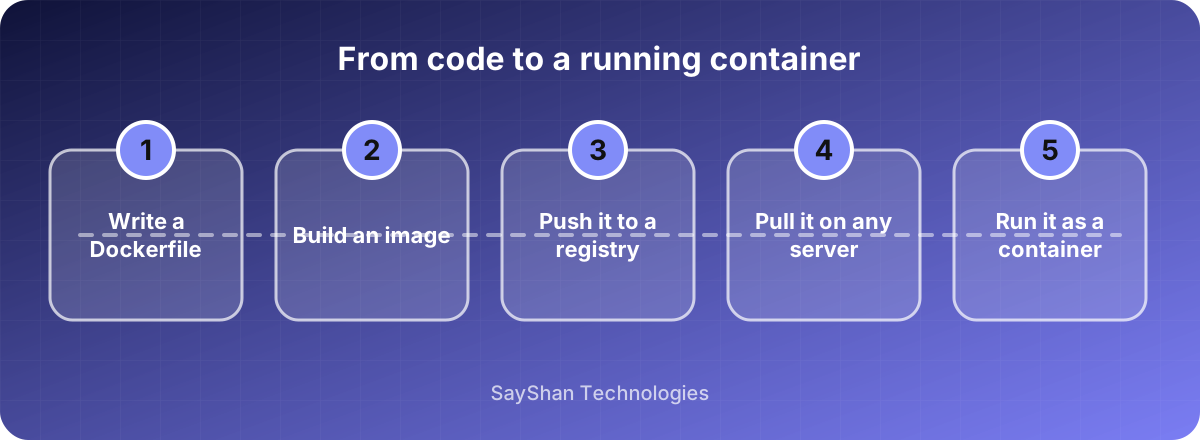
You describe how to build an image in a small text file called a Dockerfile. It's a list of steps: start from this base, copy my code in, install these packages, run this command.
Isn't that just a virtual machine?
Close, but lighter. A virtual machine carries a whole operating system, which is heavy and slow to start. Containers share the host's operating system kernel and only package the app and its dependencies. That's why they start in seconds and you can run many on one machine.
The trade-off is weaker isolation than a full virtual machine. For most web apps that's fine, but it's worth knowing when you handle highly sensitive workloads.
Why teams like it
New developers get going quickly. Instead of a two-page setup guide, they run one command and the whole project, database included, starts up. Everyone has the same versions, so "works on my machine" mostly disappears.
Deployments get more predictable too. The image you tested is the image you ship. And it's easier to run several projects with different requirements on one computer, say one that needs PHP 8.1 and another that needs 8.3.
Habits worth learning early
Keep images small. Start from a slim base image and only install what you need. Smaller images build faster, download faster and have less that can go wrong.
Don't put secrets in the image. Passwords and API keys baked into an image can leak to anyone who gets the image. Pass them in when the container starts, through environment variables or a secrets tool.
Use a .dockerignore file. It stops stray files, such as your .env, your node_modules or your git history, from getting copied in.
Pin your versions. FROM php:latest can change under you without warning. Name the version you tested.
One main process per container. Run your web server in one, your database in another, and let them talk to each other. Docker Compose is the usual tool for starting a small group of them together on one machine.
Remember that containers are disposable. When a container is removed, anything written inside it is gone. Data you need to keep, like a database, belongs in a volume.
Mistakes we see a lot
Running everything as the root user inside the container, which is convenient and a poor security habit. Copying the whole project folder before installing dependencies, which makes every tiny code change rebuild everything from scratch. Treating a container like a small server you log into and tweak by hand, rather than rebuilding the image when something needs to change. And leaving old images and volumes around until the disk fills up.
Do you actually need it?
Not always. For a simple site on shared hosting, Docker adds a layer you don't need. If you're a solo developer on one small app that never changes servers, plain setup may be simpler.
It starts paying off when you have more than one developer, more than one environment, or more than one service. If new teammates take half a day to get a working setup, or deployments behave differently from testing, that's a good moment to try it.
A sensible first step
Don't start by containerising production. Put your local development environment in Docker first, with a Dockerfile and a compose file. You'll learn the basics with nothing at risk, and your teammates get an immediate benefit.