

Speed is a feature. Slow pages frustrate visitors, lower conversions and can hurt search visibility. The good news is that most sites gain far more from a few well-chosen fixes than from clever micro-optimisations. Work through this checklist in order and measure after each change.
Why performance matters
People abandon pages that feel slow, especially on mobile networks. Search engines also use page experience signals, called Core Web Vitals, as part of ranking. The three metrics to know are:
- Largest Contentful Paint (LCP): how quickly the main content appears. Aim for under 2.5 seconds.
- Interaction to Next Paint (INP): how quickly the page responds to taps and clicks. Aim for under 200 milliseconds.
- Cumulative Layout Shift (CLS): how much the layout jumps while loading. Aim for under 0.1.
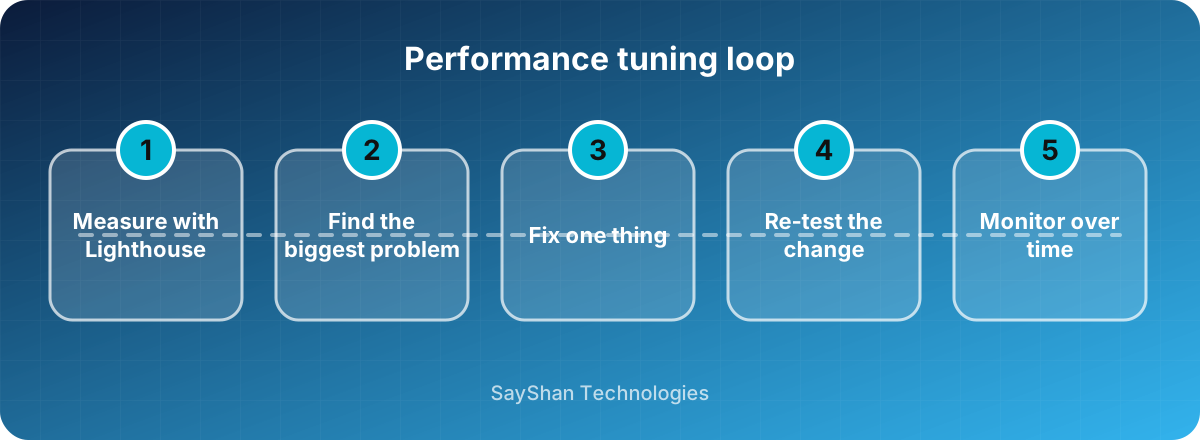
Step 1: measure first
Open Lighthouse in Chrome DevTools or use PageSpeed Insights on your key pages. Note the three metrics and the list of opportunities. Test on a throttled mobile profile, because that is what many of your visitors experience. Never optimise blindly.
Step 2: fix images
Images are usually the heaviest part of a page.
- Use modern formats such as WebP or AVIF.
- Resize images to the space they actually occupy; do not ship a 4000-pixel photo for a 400-pixel slot.
- Lazy-load images that are below the fold with
loading="lazy". - Set
widthandheightattributes so the browser reserves space and the layout does not jump. - Do not lazy-load the main hero image; load it early instead.
Step 3: reduce and compress code
- Minify CSS and JavaScript and enable Brotli or Gzip compression on the server.
- Remove libraries and scripts you no longer use; each one costs download and execution time.
- Load non-essential JavaScript with
deferand split large bundles so each page loads only what it needs. - Be careful with third-party scripts such as chat widgets and analytics; load them after the page is interactive.
Step 4: handle fonts carefully
Fonts can delay text. Self-host them, include only the character sets you need, preload the most important file and use font-display: swap so text shows immediately in a fallback font. Self-hosting also avoids a dependency on external servers that may be slow or blocked in some regions.
Step 5: use caching and a CDN
- Send long cache headers for static files with versioned names, so repeat visits are almost instant.
- Cache expensive database queries and rendered pages where content changes rarely.
- Put a CDN in front of your site if visitors are spread across regions.
Step 6: optimise the server and database
A slow server response delays everything else. Use the latest stable PHP, Python or Node version, enable opcode caching where relevant, add database indexes for slow queries and avoid running the same query repeatedly in a loop (the "N+1" problem).
Step 7: monitor over time
Performance regresses quietly as features are added. Track Core Web Vitals with real-user data, set a performance budget for page weight and re-run Lighthouse as part of your release routine.
Key takeaways
- Measure first, then fix the biggest problem.
- Images, scripts and caching deliver most of the gain.
- Reserve space for images and ads to avoid layout shifts.
- Monitor continuously so performance does not slip back.
Keep learning
Frequently asked questions
What is a good page load time?
Aim for the main content to appear in under 2.5 seconds on a mid-range phone with a typical mobile connection.
Does site speed really affect SEO?
Yes. Page experience is one of many ranking signals, and fast pages also improve engagement and conversions, which indirectly help.
Should I use a page-builder plugin?
They are convenient, but they often add heavy scripts and styles. If you use one, measure the result and remove features you do not need.
How often should I test performance?
Test before and after every significant release, and review real-user metrics monthly.